Isolinear
A desktop app to open any text, data or industry file, and edit the structured ones. Nothing in a file is run, nothing is fetched.
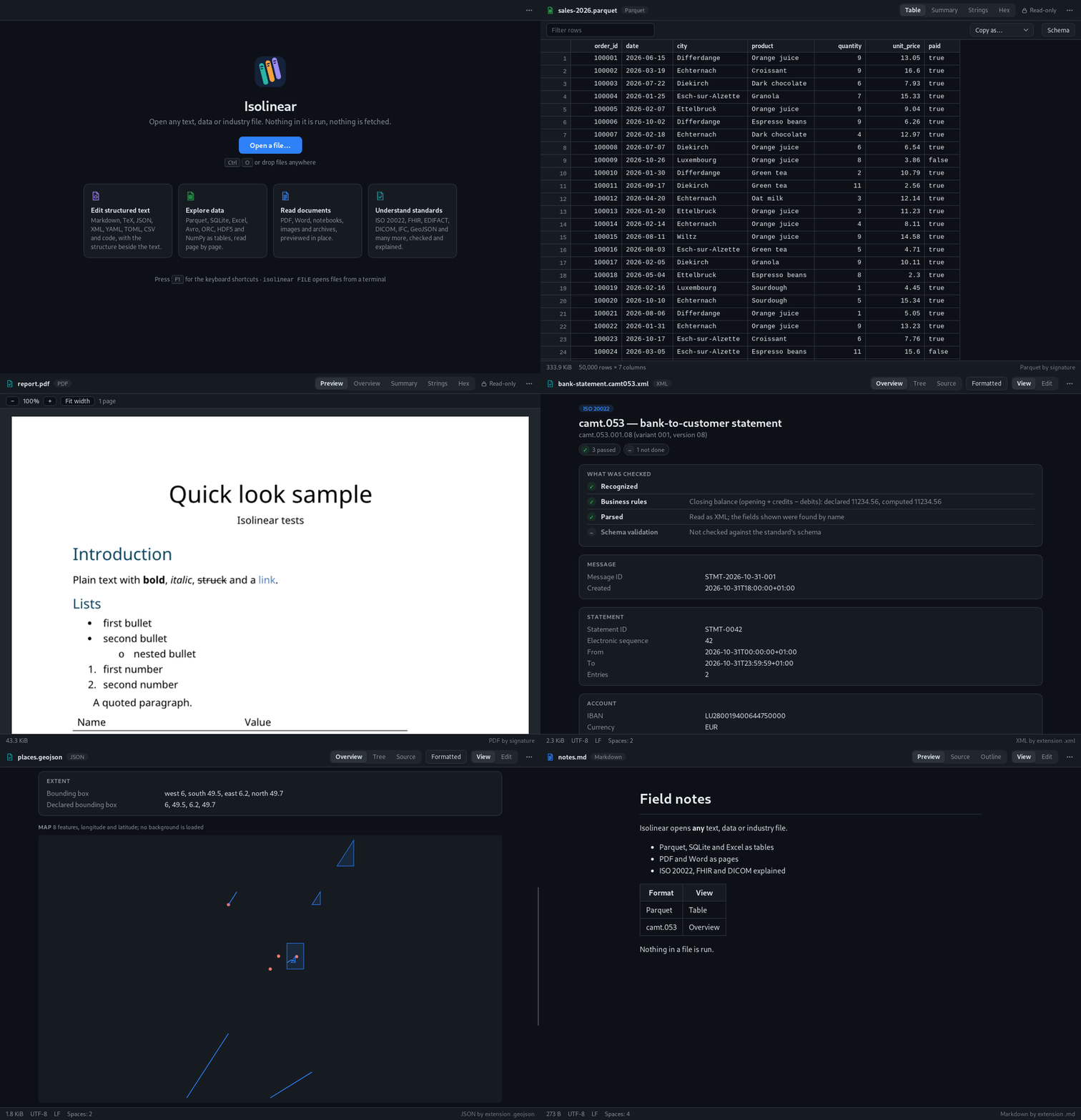
What it does
Structured text
Markdown with live preview, TeX, BibTeX, JSON, XML, YAML, TOML, CSV and source code, with the structure beside the text. Saving keeps encoding and line endings.
Data files
Parquet, SQLite, Excel, Avro, ORC, HDF5 and NumPy as tables you can sort and filter, read page by page.
Documents
PDF, Word, Jupyter notebooks, images and archives, previewed in place.
Industry standards
More than 80 formats such as ISO 20022, FHIR, EDIFACT, DICOM, IFC and GeoJSON, with what was checked and each fact linked to its place in the file.
Download
The macOS version is not notarized by Apple yet, so macOS refuses to open it at first: after dragging Isolinear to Applications, run once in Terminal:xattr -dr com.apple.quarantine /Applications/Isolinear.appFeedback is welcome on GitHub.
| System | Download | Status |
|---|---|---|
| Ubuntu / Debian (x86-64) | .deb | Tested |
| Any Linux (x86-64) | .AppImage | Tested |
| Ubuntu / Debian (ARM64) | .deb | Not tested |
| macOS (Apple Silicon) | .dmg | Tested |
| Windows (x64) | .msi | Tested |
Version 0.1.0. Install notes and checksums are on the release page. The macOS and Windows packages are not signed yet: on Windows, SmartScreen warns once; choose More info, then Run anyway.
Install from the terminal
Ubuntu, Debian: with apt Recommended
Add the Isolinear repository once. Isolinear then installs like any other package, and new versions arrive with the system updates (sudo apt update && sudo apt upgrade).
curl -fsSL https://mlaib.net/apt/isolinear.gpg \
  | sudo tee /usr/share/keyrings/isolinear.gpg >/dev/null
echo "deb [signed-by=/usr/share/keyrings/isolinear.gpg] https://mlaib.net/apt stable main" \
  | sudo tee /etc/apt/sources.list.d/isolinear.list
sudo apt update && sudo apt install isolinear
Ubuntu, Debian: download the package
Without the repository, apt does not see new versions: download the new package again to update. On ARM64, replace amd64 with arm64.
wget https://github.com/mlaib/isolinear/releases/download/v0.1.0/Isolinear_0.1.0_amd64.deb
sudo apt install ./Isolinear_0.1.0_amd64.deb
Any Linux: AppImage
wget https://github.com/mlaib/isolinear/releases/download/v0.1.0/Isolinear_0.1.0_amd64.AppImage
chmod +x Isolinear_0.1.0_amd64.AppImage
./Isolinear_0.1.0_amd64.AppImage
Then open files with isolinear notes.md data.parquet. To uninstall: sudo apt remove isolinear.
Safe by design
A file is only read. Scripts, macros, formulas, SQL, notebook code and links are never run or followed, and the app makes no network connection; a test checks it on every change.
Privacy
Isolinear collects no data. It has no telemetry, no accounts and no update checks, and it does not transfer any information to other networked systems unless specifically requested by the user or the person installing or operating it.
Code signing policy
Windows packages are to be signed with free code signing provided by SignPath.io, certificate by SignPath Foundation (application in progress). Only packages built by the project's GitHub Actions workflows from the public repository are signed.
Committers and reviewers: Mohamed Laib. Approvers: Mohamed Laib.
Free and open source under the Apache-2.0 licence, built with Claude (Anthropic) as co-author.
mlaib/isolinear